Your first prediction
In this tutorial you load the published checkpoint, ask three questions about one photo (one of each type), and read the answers. It takes a few minutes on a CPU, most of it downloading the weights once.
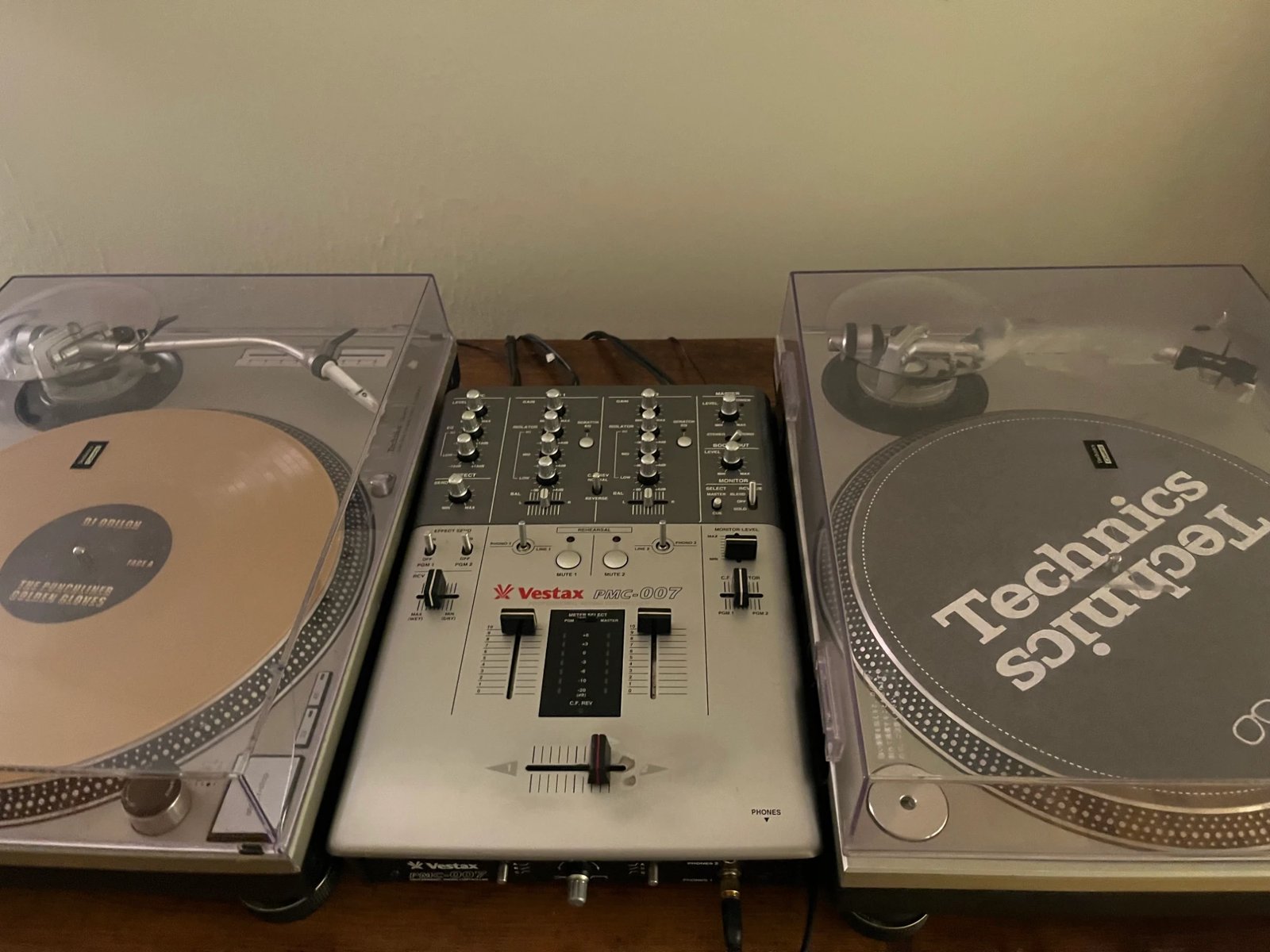
You need the package installed. The photo is two turntables and a mixer:
example.jpg. Save it next to your script.
1. Load the checkpoint
import laya
from PIL import Image

agent = laya.load_vlm("thaitea/laya-vision")
2. Ask three typed questions
The first argument is the state: the image plus any text context as a dictionary. The second is the
questions, each with a type, instructions and, for choice and score, criteria.
result = agent.predict(
    {"image": Image.open("example.jpg"), "note": "listing photo for a used DJ setup"},
    {
        "category":  {"type": "choice", "instructions": "What kind of item is this?",
                      "criteria": ["electronics", "clothing", "furniture", "food", "other"]},
        "record":    {"type": "noul", "instructions": "Is there a vinyl record on one of the turntables?"},
        "condition": {"type": "score", "instructions": "What condition is the equipment in?",
                      "criteria": ["poor: broken or missing parts", "fair: heavy wear", "good: light wear", "like new"]},
    },
)
All three questions are answered in one call. The image is encoded once and reused for every question; nothing is generated.
3. Read the answers
result["answers"] has one entry per question. This is what the checkpoint returned, at Hub revision 8b318c9
(the 201M checkpoint published 2026-09-24), on a CPU in float32. A later checkpoint gives different numbers; pin
one with load_vlm(..., revision=...).
{
  "category": {
    "type": "choice",
    "choice": "electronics",
    "probabilities": {"electronics": 0.8571, "clothing": 0.0285, "furniture": 0.0314, "food": 0.0276, "other": 0.0554},
    "confidence": 0.6261,
    "action": {"act_probability": 0.9796}
  },
  "record": {
    "type": "noul",
    "noul": 0.2924,
    "confidence": 0.7076,
    "action": {"act_probability": 0.9997}
  },
  "condition": {
    "type": "score",
    "score": 1.9767,
    "legend": {"0": "poor: broken or missing parts", "1": "fair: heavy wear", "2": "good: light wear", "3": "like new"},
    "probabilities": {"0": 0.1287, "1": 0.1946, "2": 0.2481, "3": 0.4286},
    "confidence": 0.0685,
    "action": {"act_probability": 1.0}
  }
}
category(choice):choiceis the most probable option, hereelectronicsat 86%. The probabilities are over the options you listed and sum to 1.condition(score):scoreis the expected level, the probability-weighted average of the level indices, here 1.98, around "good". The probabilities show the model leaning to "like new" (43%) but spread over every level, andconfidence(0.07, one minus the normalised entropy) says the same.record(noul):noulis P(true). Here it is 0.29, and it is wrong: the left turntable holds a gold record. A probability is the model's belief, calibrated on its validation sets, not a guarantee; on your own photos, check a sample and calibrate on your data before acting on a threshold.
The rest of the result records what produced the numbers:
result["usage"]       # {"input_tokens": 388, "output_tokens": 0, "images": 1}
result["provenance"]  # prompt format version, checkpoint and backbone revisions, dtype, device, library
                      # versions, a sha256 of every input id, and the temperature each question was divided by
What you did
You ran a vision-language model as a classifier over options you wrote yourself, for three question types at once, and read calibrated probabilities instead of generated text. Next:
- Ask your own questions in the demo Space.
- Every field and argument: predict() and the answer schema.
- Why an option can be read in one pass: How it works.